Automatic Translation In PowerPoint

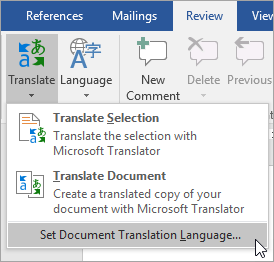
Microsoft PowerPoint natively supports translation, allowing you to translate your slides and provide translated subtitles to your presentations in real time. This feature is available on Classroom computers and at home (Office365 users). It is not available in the IT Suite computers, as they have Office 2016. Translate text To translate text in PowerPoint, select […]

Automatic Translation In PowerPoint Read More »

PowerPoint: Record a slide show with narration and slide timings

Narrations and timings can enhance a web-based or self-running slide show. If you have a sound card, microphone, and speakers, and (optionally) a webcam, you can record your PowerPoint presentation and capture narrations, slide timings, and ink gestures. After you have made the recording, it’s like any other presentation that can be played for you

PowerPoint: Record a slide show with narration and slide timings Read More »

Office 365 Download

Getting yourself Office365 applications for your Laptop/Computer All staff at Gosford Park  have an email address, this email address can be used to download and install Office 365 onto your own personal computer; for free! Navigate to your emails by clicking here. Next you will need to log onto your email, you should know these details. If

Office 365 Download Read More »